
Never grind alone.
Your desktop notices what you're working on and finds someone doing it too.
Apple Silicon (M1 or newer) · Free · Install steps
LeetCode · right now
Priya is also doing LeetCode right now. Want to work alongside her?
How it works
You do nothing extra. No posting, no searching, no scheduling.
It notices
TaskMatch sits in your menu bar and picks up what you're on: a LeetCode problem, job applications, a CS course.
It finds someone
Every few minutes it looks for someone working on the same thing at the same moment.
You meet
One low-pressure popup. If you both accept, a video call opens for the two of you.
You stay connected
Add each other, and TaskMatch tells you when they're working on that topic again.
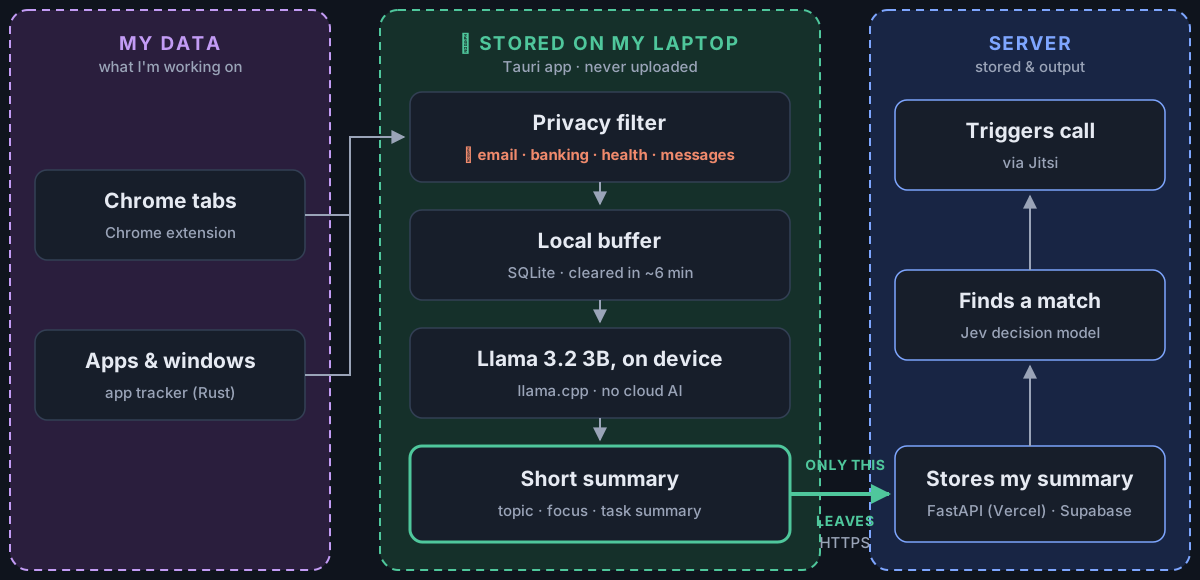
Your activity stays on your laptop
Private pages and apps are filtered out first. Llama 3.2 runs on your Mac and turns the rest into one short sentence and a topic. That's all the server ever sees: no URLs, no page text, no titles.
Install
About a minute. You don't need an account. Apple Silicon Macs (M1 or newer).
- Open Terminal (press
⌘ Space, type Terminal, press Enter), paste this line and press Enter:It downloads TaskMatch, puts it in Applications and opens it.curl -fsSL https://taskmatch-site.vercel.app/install.sh | bash - Click the 🌍 in your menu bar at the top right of your screen. TaskMatch has no Dock icon and no window until you click the globe. A popup will remind you.
- Click Skip, try it as a guest.
- Try a match: pick a demo task to see the match popup and call flow without any setup.
Or download the .dmg (needs one extra Terminal step)
- Download TaskMatch for Mac (.dmg), open it and drag the app into Applications. It shows up as work-match.
- Eject the installer disk: right-click the work-match disk on your Desktop or in Finder's sidebar and choose Eject. It has the same globe icon as the app, so it's easy to open by mistake.
- Required, or the app won't open: TaskMatch isn't from the App Store yet, so macOS will say it's damaged or can't be opened. Before opening it, run this once in Terminal to clear that flag:
xattr -cr /Applications/work-match.app - Open work-match from Applications, then click the 🌍 in your menu bar.
Optional: match on your real activity
- Download the local AI model, Llama 3.2 3B (2.0 GB), or the lighter 1B version (0.8 GB), into:
~/Library/Application Support/com.sultanalzoghaibi.workmatch/models/ - Download the Chrome extension and unzip it. In Chrome, open
chrome://extensions, turn on Developer mode, click Load unpacked and pick the unzipped folder. - Restart TaskMatch and turn on friend finding.